Top 6 Scheduling Tools for Franchise Operators: A Practical Comparison


For restaurant franchise operators, scheduling is never just about filling shifts. It is about balancing labor costs across locations, staying compliant with an increasingly complex set of labor laws, and ensuring every restaurant has the right people on the floor at the right time. As restaurant groups scale from a handful of locations to dozens or even hundreds, scheduling quickly becomes one of the most complex operational challenges they face.
Unlike single-location restaurants, franchise operators must manage multiple schedules, shared staff, varying sales volumes, and different state and local labor regulations — often across disconnected systems. The scheduling tool that works well for an independent restaurant can quickly break down in a multi-unit environment.
This article provides an objective comparison of the top scheduling tools used by franchise and multi-location restaurant operators today. The goal is not to crown a single “best” platform, but to help operators understand which tools are built for franchise complexity, where each solution excels, and how to choose the right fit for their operational model.
The Unique Scheduling Challenges Restaurant Franchise Operators Face
Multi-Location Complexity
Franchise operators operate in a fundamentally different reality than single-store owners. Scheduling decisions ripple across locations, budgets, and compliance obligations.
High Labor Costs and Tight Margins
Labor is typically the largest controllable expense in restaurant operations. Franchise operators require tools that extend beyond simple, static schedules. Franchises require a scheduling platform that provides real-time labor cost visibility, forecasting, and overtime prevention — especially when managing dozens of weekly schedules simultaneously.
Compliance Requirements Across Jurisdictions
Multi-state operators face a web of labor regulations, including predictive scheduling laws, minor work rules, overtime thresholds, and mandated breaks. Scheduling tools must help enforce these rules proactively, rather than just documenting issues after the fact.
High Turnover and an Hourly Workforce
Hourly restaurant teams experience high turnover, meaning new employees are constantly joining and learning the ropes. Mobile-first scheduling tools enable these employees to quickly access schedules, request shift swaps, and stay connected with managers, thereby reducing training time and minimizing errors. For franchise operators, fast adoption and usability are just as critical as accurate backend controls.
Disconnected Systems
In many restaurant groups, scheduling, time tracking, payroll, and POS systems operate in silos. This disconnect creates manual work, increases payroll errors, and limits operators’ ability to analyze sales versus labor performance across locations.
How We Evaluated Scheduling Tools
To fairly compare scheduling platforms, this article evaluates each solution against criteria that matter most to franchise and multi-unit restaurant operators:
- Scheduling automation and flexibility
- Labor forecasting and cost visibility
- Multi-location management capabilities
- Compliance features and safeguards
- Time tracking and attendance accuracy
- Integrations with POS and payroll systems
- Cross-location reporting dashboards
- Ease of rollout and ongoing use
- Scalability
Competitor Overviews: Strengths, Considerations, and Ideal Fit
1. Push Operations
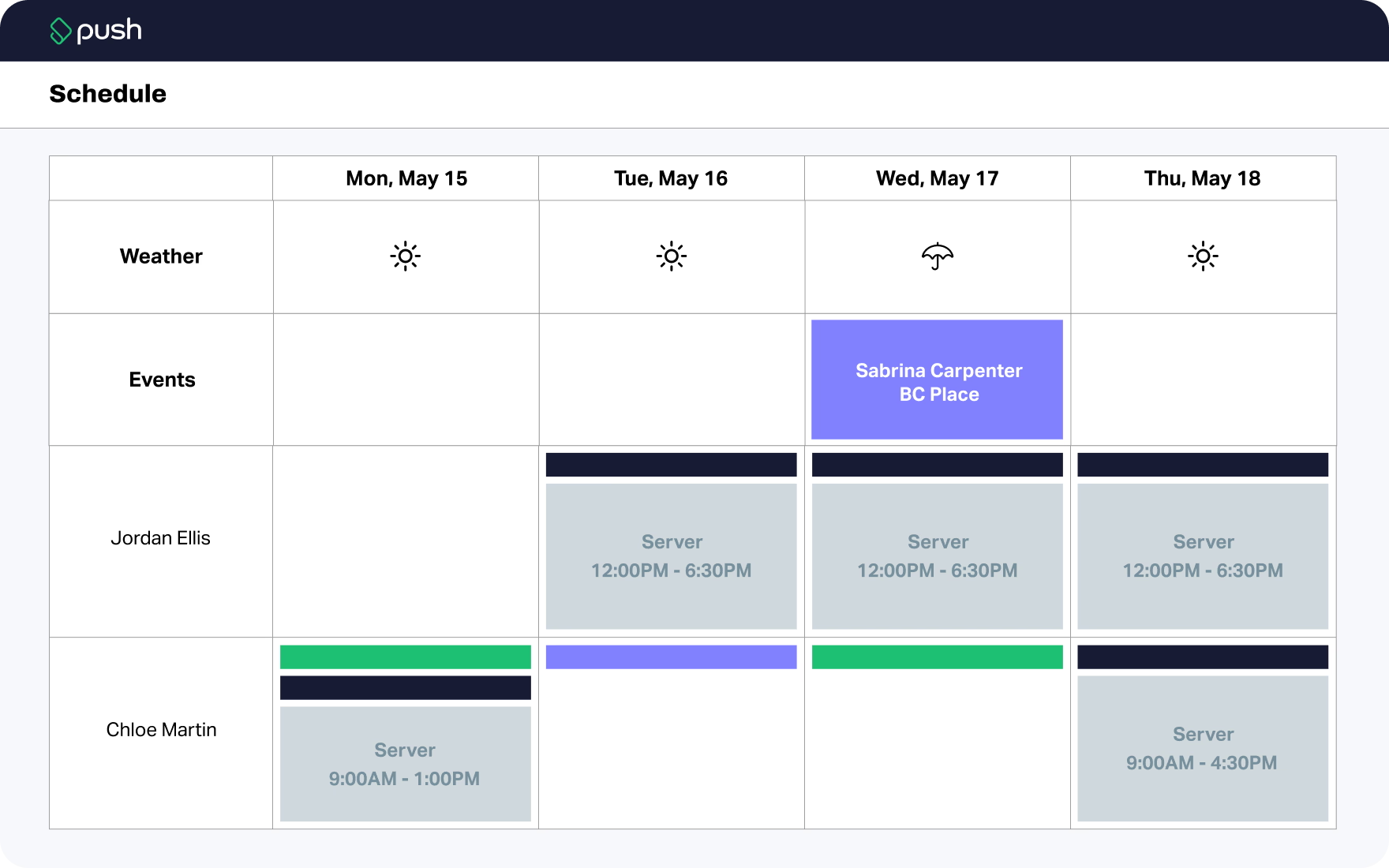
Push Operations is purpose-built for multi-unit restaurant operators and franchise groups that require more than standalone shift scheduling. Rather than treating scheduling as an isolated task, Push unifies scheduling, time and attendance, payroll, tip management, and compliance into a single labor management platform designed to scale across locations, regions, and states.
By directly connecting schedules to time tracking, payroll, POS sales data, and tips, Push enables operators to move beyond static schedules and toward forecast-driven labor planning tied directly to sales performance. Auto-scheduling and schedule templates help managers build optimized schedules faster, while mobile shift swaps and time-off requests streamline day-to-day adjustments without sacrificing oversight. Built-in overtime and compliance alerts proactively flag issues before they become costly violations. These features are particularly valuable for franchise systems managing complex wage structures, tipped labor, large hourly workforces, and varying labor regulations across jurisdictions.
- Strengths: Forecast-driven scheduling tied to sales, auto-scheduling, mobile shift swaps and time off requests, real-time labor cost visibility, enterprise-grade multi-location support, built-in compliance alerts and guardrails, robust tip management, strong POS integrations, and native payroll that eliminates manual data handoffs.
- Points of Consideration: Because Push integrates multiple functions into a single platform, the initial rollout can involve more setup than a simple scheduler, and pricing is typically provided on inquiry rather than as a transparent tiered list.
Ideal for: Fast casual, dine-in, and multi-state franchise groups that need unified scheduling, labor control, compliance, and enterprise-level reporting all in one platform.
2. 7shifts
7shifts is a restaurant-focused scheduling platform widely adopted by independent and multi-unit operators. It prioritizes ease of use, rapid schedule creation, and robust employee engagement. Managers can build schedules using an intuitive drag-and-drop interface, apply role- and availability-based rules, and reuse schedule templates to speed up weekly planning. On higher-tier plans, 7shifts offers sales-based labor forecasting and auto-scheduling features that help align staffing levels with expected demand. The platform also provides basic overtime warnings and labor alerts during schedule creation, helping managers avoid unplanned overtime; however, its compliance capabilities are lighter compared to those of enterprise labor management systems. Other features include shift swapping and strong team communication tools, along with integrations to many popular POS systems. Payroll and tip management are available through add-ons or integrations.
- Strengths: Intuitive drag-and-drop scheduler, strong POS integrations, mobile-friendly interface, employee communication tools, and tiered pricing options that scale up with advanced features.
- Points of Concern: Many key capabilities, including deeper labor forecasting, auto-scheduling, and advanced compliance tools, are gated behind higher-tier plans, which can lead to rapid cost increases as additional features are added. Some third-party comparisons also note that, relative to platforms with ultra-detailed forecasting or compliance engines, basic labor planning can feel limited for very large or highly regulated multi-location operations.
Ideal for: Single-location or multi-unit restaurants focused on usability, team engagement, and POS-integrated scheduling.
3. Connecteam
Connecteam is a versatile, mobile-first workforce management platform used across multiple industries, including food service, with scheduling as one of its core functions. Managers can create, edit, and share schedules across multiple locations, assign shifts by role or availability, and reuse schedule templates to simplify weekly planning. The platform also supports time tracking, mobile clock-in/out, and shift swapping, helping teams stay aligned and reducing scheduling conflicts. While payroll functions typically rely on third-party integrations, Connecteam ties schedules to labor tracking and allows managers to monitor hours, overtime, and basic labor alerts directly within the platform. Beyond scheduling, Connecteam combines team communication, task management, and employee training modules, enabling multi-location operators to centralize workforce management in a single platform.
- Strengths: Combines scheduling with communication, task management, and training modules within a mobile-first interface, helping frontline and deskless teams stay connected and productive.
- Points of Concern: Not a hospitality-specific platform, so its scheduling and labor forecasting are less tailored to restaurant operations than platforms explicitly built for multi-unit restaurants. Operators may still need integrations for payroll or predictive labor rules, and the platform’s broad feature set can feel more complex than necessary if scheduling is the primary focus.
Ideal for: Multi-location operators or franchise groups that prioritize employee communication, task management, and training alongside scheduling.
4. Sling (by Toast)
Sling is a restaurant scheduling tool integrated within the Toast POS ecosystem, designed to streamline shift planning and labor visibility for restaurants already on Toast. At its core, Sling provides intuitive schedule creation with shift templates, availability management, shift offers, and time‑off requests to help managers build and adjust weekly rosters quickly. When synced with Toast sales data, Sling displays labor costs in real-time and compares scheduled labor to projected and actual sales, enabling restaurants to stay on budget and avoid unexpected overtime. Additional features include time tracking, break automation, schedule reminders, and tools to prevent conflicts like overlapping shifts or late arrivals, making Sling a seamless and efficient choice for restaurants already on Toast.
- Strengths: Offers a generous free tier with unlimited scheduling, affordable per-user pricing, foundational labor cost insights, and seamless connection to Toast sales data.
- Points of Consideration: More advanced reporting, compliance tooling, and deeper labor forecasting capabilities are typically available at higher-tier levels or through additional Toast products. As a result, Sling’s scheduling functionality may feel more streamlined compared to platforms built specifically for managing complex, multi-location restaurant labor.
Ideal for: Restaurants using Toast POS that want integrated, easy-to-use scheduling without managing a separate standalone workforce management system.
5. HotSchedules (Fourth)
HotSchedules is an enterprise-grade labor management platform designed for large hospitality and restaurant organizations. It offers advanced forecasting, demand modeling, and analytics, but implementation typically requires more time, training, and operational resources than simpler scheduling tools.
- Strengths: Provides robust, data-driven scheduling capabilities that support complex multi-location operations, including skill- and role-based scheduling and extensive compliance management.
- Points of Concern: Pricing is generally quote-based and tends to be higher than small- or mid-market solutions. Onboarding and training may require dedicated resources, and some operators find the interface less streamlined compared to lighter, simpler scheduling tools.
Ideal for: Large restaurant chains and enterprise hospitality organizations that require advanced forecasting, compliance support, and analytics, and that have the operational capacity to manage a more complex labor management system.
6. Deputy
Deputy is a versatile workforce management platform used across multiple industries, including restaurants. It combines scheduling, time tracking, and compliance management into a single platform, providing managers with the tools to create, manage, and adjust schedules efficiently across multiple locations. The platform is designed to accommodate a variety of workforce models, from hourly front-line staff to multi-role teams, making it a flexible option for operators with diverse scheduling needs.
- Strengths: Built to accommodate skill and role-based scheduling, complex labor rules, and extensive compliance needs. These capabilities make it well-suited for organizations managing large workforces with varied roles, certifications, and regulatory obligations across multiple jurisdictions.
- Points of Concern: Its per-user pricing model can be more expensive for restaurants with large hourly teams compared to per-location plans. Some advanced features, like deeper sales-linked forecasting, are only available in higher tiers.
Ideal for: Multi-location operators who need compliance automation, flexible scheduling, and workforce management across industries, particularly when adaptability and regulatory support are more important than restaurant-specific sales-driven labor forecasting.
Key Features that Matter for Franchise Operators
For franchise and multi-unit operators, scheduling software must do more than simplify weekly shift creation. At scale, scheduling becomes a system for cost control, risk management, and operational consistency. The following features separate basic schedulers from franchise-grade platforms.
Scheduling Automation
Automation is most valuable when it reduces repetitive work without removing managerial control. Franchise operators benefit from automation that supports consistency across locations while allowing flexibility at the store level.
High-impact automation capabilities include:
- Auto-scheduling based on templates, availability, and forecasted demand
- Manager-approved shift swapping to maintain coverage and compliance
- Cross-location scheduling controls for shared or floating staff
- Role- and skill-based shift assignments
Restaurant-specific platforms typically outperform generic tools when automation is tied to sales patterns and labor targets, rather than relying solely on static rules. This allows schedules to adjust dynamically to real demand instead of relying on last week’s assumptions.
Labor Forecasting & Cost Control
Labor forecasting is one of the clearest differentiators between entry-level scheduling tools and platforms built for franchise operations. Forecasting connects scheduling decisions directly to financial performance.
Franchise-grade tools support:
- Sales forecasting informed by POS data and historical trends
- Labor modeling that shows projected labor spend before schedules are published
- Real-time visibility into labor costs as shifts are worked
- Overtime alerts that surface risk early enough to take action
For multi-unit operators, the ability to compare labor performance across locations and regions is critical. Forecasting and cost visibility enable leadership teams to identify systemic issues, not just isolated store-level problems.
Compliance & Labor Laws
Compliance complexity increases exponentially as franchise groups expand into new markets. Labor laws governing breaks, overtime, and minor employment vary widely by jurisdiction, making manual enforcement unreliable.
Key compliance features include:
- Automated break and overtime alerts during scheduling and time tracking
- Supports advance schedule notice requirements in jurisdictions where mandated
- Minor labor rule enforcement based on age, role, and time of day
- Audit logs and historical records for schedules, punches, and edits
Platforms that embed compliance directly into scheduling workflows help reduce risk before labor is worked, rather than flagging violations after payroll is processed.
Integrations
Scheduling does not exist in isolation, especially in franchise environments where multiple systems must stay in sync.
Critical integrations include:
- POS system
- Time tracking system
- Payroll platform
While integrations can extend functionality, franchise operators should consider the operational tradeoff. Fewer systems generally mean fewer failure points, cleaner data flows, and less manual reconciliation — especially during payroll and compliance audits.
Time Tracking & Attendance
Accurate time tracking protects both margins and compliance risk. For franchise operators, even minor inaccuracies can escalate into substantial financial exposure.
Important attendance features include:
- Geofencing or location-based clock-ins to prevent early or off-site punches
- Photo or identity verification to reduce time theft
- Punch approval workflows and configurable rounding rules
- Clear audit trails for time edits
Platforms that tightly connect scheduling and time tracking reduce payroll errors and improve trust in labor data across the organization.
Reporting & Multi-Unit Dashboards
Franchise leadership needs visibility without micromanagement. Reporting should surface trends, exceptions, and opportunities, rather than overwhelming teams with raw data.
High-value reporting includes:
- Enterprise roll-up dashboards spanning all locations
- Location-level comparisons to identify outliers
- Sales versus labor reporting to assess efficiency
- Customizable reports tailored to operations, finance, or HR stakeholders
Effective reporting supports forward-looking decisions, not just historical review.
Mobile Experience
In franchise environments with hourly workforces, adoption depends heavily on mobile usability. A strong mobile experience reduces friction for both employees and managers.
Key mobile capabilities include:
- Employee apps for schedule access, shift swaps, and time-off requests
- Manager tools for approvals, schedule edits, and labor monitoring
- Built-in communication to reduce reliance on external messaging apps
- Shift coverage workflows to address call-outs quickly
When mobile tools are intuitive, schedules stay accurate, changes are documented, and managers spend less time chasing confirmations.
Choosing the Right Scheduling Tool for Your Franchise
Every franchise group operates differently, but patterns emerge when matching tools to needs.
- Push Operations is best for franchise operators needing unified scheduling, time tracking, payroll, compliance, and customizable reporting in one system.
- 7shifts is best suited for restaurants that prioritize team communication and user-friendly scheduling.
- Connecteam is best for franchise groups prioritizing operational communication and mobile workforce management beyond scheduling alone.
- Sling (Toast) is best for Toast POS users wanting native scheduling within their existing ecosystem.
- HotSchedules is best for large enterprise restaurant brands requiring deep forecasting and advanced analytics.
- Deputy is ideal for businesses that need compliance automation and flexible scheduling across various industries.
Why the Right Scheduling Platform Matters for Franchise Growth
Scheduling is one of the most strategic operational decisions franchise operators make. The right platform can reduce labor costs, improve compliance, and give leadership real-time insight into performance across locations. The wrong platform can create manual work, data gaps, and unnecessary risk.
For franchise and multi-unit restaurant operators, the most important question is not which scheduling tool has the most features, but which one aligns with their scale, systems, and long-term growth plans. Platforms designed specifically for multi-location restaurants tend to deliver the greatest value when labor forecasting, compliance, and reporting are critical.
As franchise groups continue to scale and labor regulations evolve, investing in the right scheduling technology is no longer optional. It is a foundational component of sustainable and profitable restaurant operations. For franchise operators focused on growth, margin control, and compliance at scale, book a demo with Push to see how scheduling, labor forecasting, and payroll work together in one platform.